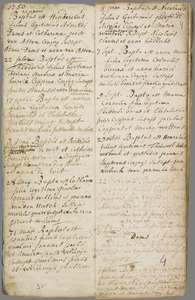
Baptism on in Dommelen (Netherlands)

Father

Guelmus Joannes Peels

Mother

Maria Jansse Verkoije

Child

Witnesses


Source citation

Regional Historic Centre Eindhoven, Church records baptisms
Collectie doop-, huwelijks- en overlijdensregisters daterend van voor de invoering van de Burgerl..., Dommelen, access code 10225, inventory number 10.2, 31-05-1750, Doop-, trouw- en begraafboek Dommelen, folio 3v


Internet address

  • https://proxy.archieven.nl/48/A7CD3FCD90F243DA9B983AF68AA2A519
  • https://www.openarchieven.nl/rhe:A7CD3FCD-90F2-43DA-9B98-3AF68AA2A519

To have Open Archives automatically search for additional information and related documents, you must be logged in.


Comments

On Sunday, 1 March Gerard Peels wrote

Hallo
Volgende aanvulling vwb het echtpaar Peels-Verkoijen, getrouwd
https://www.openarch.nl/bhi:fa32d456-18b6-4458-5ea4-3b4f9f82b53e
Kinderen:
Hendrina Peels, Doop op 2 januari 1749 te Dommelen, https://www.openarch.nl/rhe:81E835EC-C9DC-4ED9-BD0D-ABA9AC50CB61
Joannes Peels, Doop op 31 mei 1750 te Dommelen, https://www.openarch.nl/rhe:A7CD3FCD-90F2-43DA-9B98-3AF68AA2A519
Jacobus Peels, Doop op 30 april 1752 te Dommelen, https://www.openarch.nl/rhe:66D2CE24-0AFC-42E5-B5B0-28A0FB0C0727
Josephus Peels, Doop op 5 december 1753 te Dommelen, https://www.openarch.nl/rhe:C78FCB35-DBE8-4599-AFA4-D5DDFF1656A3
Hendrina Peels, Doop op 1 maart 1755 te Dommelen, https://www.openarch.nl/rhe:0AE88A9B-F698-4F5D-ADAF-C6BE99E2967C
Elisabetha Peels, Doop op 27 mei 1758 te Westerhoven, https://www.openarch.nl/bhi:17539c88-661b-616e-04f7-2a8f25311b1f

Mvg

Gerard Peels


You are not logged in yet

Login
Not a subscriber? View subscriptions!

Scan

Scan
Click the image to zoom in

Find your ancestors and publish your family tree on Genealogy Online via https://www.genealogieonline.nl/en/

Report an error

There may be errors in the data of documents. Copying data from (scans of) originals is human work. But computers that can read handwriting can also make mistakes.

If you find an error in the data you are encouraged to report it so that this can be corrected in the source at the archival institution or association.

To use this feature, you need to login first.

Download as GEDCOM or PDF

If the information you find on Open Archives, is useful for your research, you can download it in PDF and GEDCOM format.

GEDCOM files can be imported into your family tree program. This way you do not need to type all the information in your family tree program.

To use this feature, you need to login first.

Mark document as favorite

You can add the documents you find on Open Archives that are useful for your research to your list of favorite documents. You can organize this list and when searching you will immediately see which documents are already on your list of favorite documents.

Favorite person entries can be downloaded in PDF format (ideal for printing) and GEDCOM format (ideal for reading into your family tree program).

To use this feature, you need to login first.

Add comment

Do you have additional information about the historical document? Then add it so that other researchers can benefit from it as well.

To avoid spam and invasion of privacy of living personas, comments are checked before being published.

To use this feature, you need to login first.

Automatically search for the children

Open Archives searches automatically, based on available records, for the children of couples.

If children are found, this will be indicated with a purple = sign (a gray = sign does not imply that there are children).

To use this feature, you need to login first.

Automatically search for the children

Open Archives searches automatically, based on available records, for the children of couples.

If children are found, this will be indicated with a purple = sign (a gray = sign does not imply that there are children).

To use this feature, you need to login first.

Automatically search for the children

Open Archives searches automatically, based on available records, for the children of couples.

If children are found, this will be indicated with a purple = sign (a gray = sign does not imply that there are children).

To use this feature, you need to login first.