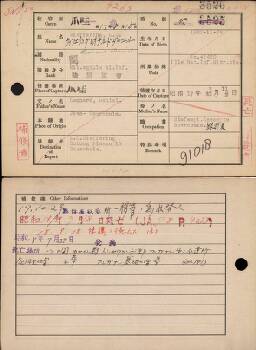
Registration (from the period 1942-1996)

Registered


Extra information

Volledige naamLeonard Daniel Wieffering (レオナルド ダニエル ウィフェリング)
NationaliteitNetherlands (蘭)
Rang(陸軍 軍曹)
Stamboeknummer43420
Plaats gevangename爪哇; Java
Datum gevangename17/03/11[11/03]; 1942/03/11[11/03]
Beroep(銀行員)
Opmerkingen91018
Kamp 1爪哇 17/08/15; Java POW Camp 1942/08/15
Kamp 2泰; Thai POW Camp
Japans 13526[3525]
Japans 2泰V (タイ俘虜収容所第5分所)11096; No.5 Branch Camp of Thai POW Camp 11096
Japans 3本(泰俘虜収容所本所)30796; Main Camp of Thai POW Camp 30786
Andere informatieDeparted to be Transferred to Thai POW Camp on 29 October 1942; Died on 18 September 1943. (JA.78 P.4263); Died of contused wound on 18 October 1943. Burial; Fell ill on 22 July 1943; Place of death: No.1 Detached Camp, Aungganaung, Taungdwingy county, Kayaeen prefecture, Burma; Disposal of remains: Burial. Buried in Aungganaung Cemetery(JA181); (17.10.29 泰俘虜収容所ー移管のため出発す; 昭和18年9月18日死亡(JA.78 P.4263); 18.9.18 挫傷にて死亡す(土); 昭和18年7月22日発病; 死亡場所 ビルマ国カヤイン県トンヤウランヂ郡アンガナン第1分遣所; 死体処理 土葬 アンガナン墓地に埋葬 (JA181); )

Source citation

National Archives, PoW cards
Min. van Binnenl. Zaken: Stamboekgegevens KNIL-militairen met Japanse Interneringskaarten 1942-1996, Den Haag, archive 2.10.50.03, inventory number 458

A research guide is available for this source


View on source website

Internet address

  • https://www.openarchieven.nl/ghn:eb765ec4-e133-43a2-81dd-c59325ec00d6

To have Open Archives automatically search for additional information and related documents, you must be logged in.


Comments

Are you the first person who provides additional information?


You are not logged in yet

Login
Not a subscriber? View subscriptions!

Scan

Scan

Click the image to zoom in or download the image

Find your ancestors and publish your family tree on Genealogy Online via https://www.genealogieonline.nl/en/

Report an error

There may be errors in the data of documents. Copying data from (scans of) originals is human work. But computers that can read handwriting can also make mistakes.

If you find an error in the data you are encouraged to report it so that this can be corrected in the source at the archival institution or association.

To use this feature, you need to login first.

Download as GEDCOM or PDF

If the information you find on Open Archives, is useful for your research, you can download it in PDF and GEDCOM format.

GEDCOM files can be imported into your family tree program. This way you do not need to type all the information in your family tree program.

To use this feature, you need to login first.

Mark document as favorite

You can add the documents you find on Open Archives that are useful for your research to your list of favorite documents. You can organize this list and when searching you will immediately see which documents are already on your list of favorite documents.

Favorite person entries can be downloaded in PDF format (ideal for printing) and GEDCOM format (ideal for reading into your family tree program).

To use this feature, you need to login first.

Add comment

Do you have additional information about the historical document? Then add it so that other researchers can benefit from it as well.

To avoid spam and invasion of privacy of living personas, comments are checked before being published.

To use this feature, you need to login first.

Automatically search for the children

Open Archives searches automatically, based on available records, for the children of couples.

If children are found, this will be indicated with a purple = sign (a gray = sign does not imply that there are children).

To use this feature, you need to login first.

Automatically search for the children

Open Archives searches automatically, based on available records, for the children of couples.

If children are found, this will be indicated with a purple = sign (a gray = sign does not imply that there are children).

To use this feature, you need to login first.

Automatically search for the children

Open Archives searches automatically, based on available records, for the children of couples.

If children are found, this will be indicated with a purple = sign (a gray = sign does not imply that there are children).

To use this feature, you need to login first.