Registration (from the period 1942-1996)

Registered


Extra information

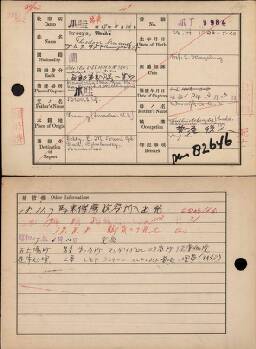
Volledige naamTheodoor Armand A Broers (テオトル アルマント ブロス)
NationaliteitNetherlands (蘭)
Rang(自動車部隊 2等兵)
Stamboeknummer3403
Plaats gevangename爪哇; Java
Datum gevangename17/03/08; 1942/03/08
Beroep(質屋 役人; Pawnshop manager)
OpmerkingenPens 82646
Kamp 1爪哇 17/08/15[06/14]; Java POW Camp 1942/08/15[06/14]
Kamp 2馬来; Malay POW Camp
Japans 1爪I(ジャワ俘虜収容所第1分所) 9984; No1 Branch Camp of Java POW Camp 9984
Andere informatieDeparted for Malay POW Camp on 7 November 1943; Died at 22:16 on 8 August 1944 (JA113 P.21; Died of beri-beri on 8 August 1944 (Burial); Fell ill on 10 June 1944; Place of death: POW Hospital of Sungai Gerong POW Camp, No.2 Branch Camp of Malay POW Camp; Disposal of body: Burial. Buried in xxx Kantontantoxxx cemetery, Rangoon, Burma (VA43); (昭和18年11月7日マレイ俘虜収容所へ出発;  昭和19年8月8日死亡 (JA113 P21) 22時16分; 昭和19年8月8日 脚気にて死亡 (土); 昭和19年6月10日 発病; 死亡場所:マレイ第2分所スンゲイグロン収容所俘虜病院; 死体処理:土葬 ビルマ ラングーン カントンタント墓地に埋葬(VA43);)

Source citation

National Archives, PoW cards
Min. van Binnenl. Zaken: Stamboekgegevens KNIL-militairen met Japanse Interneringskaarten 1942-1996, Den Haag, archive 2.10.50.03, inventory number 422

A research guide is available for this source


View on source website

Internet address

  • https://www.openarchieven.nl/ghn:8a3087f4-bdae-43da-a781-6edcc808aabc

To have Open Archives automatically search for additional information and related documents, you must be logged in.


Comments

On Monday, 13 June Sonja Broers Gossling wrote

I am Sonja Broers and am the niece of Theodoor Armand Broers. If anyone reads this comment please contact me. I am interested in finding Theodoor's children.


You are not logged in yet

Login
Not a subscriber? View subscriptions!

Scan

Scan

Click the image to zoom in or download the image

Find your ancestors and publish your family tree on Genealogy Online via https://www.genealogieonline.nl/en/

Report an error

There may be errors in the data of documents. Copying data from (scans of) originals is human work. But computers that can read handwriting can also make mistakes.

If you find an error in the data you are encouraged to report it so that this can be corrected in the source at the archival institution or association.

To use this feature, you need to login first.

Download as GEDCOM or PDF

If the information you find on Open Archives, is useful for your research, you can download it in PDF and GEDCOM format.

GEDCOM files can be imported into your family tree program. This way you do not need to type all the information in your family tree program.

To use this feature, you need to login first.

Mark document as favorite

You can add the documents you find on Open Archives that are useful for your research to your list of favorite documents. You can organize this list and when searching you will immediately see which documents are already on your list of favorite documents.

Favorite person entries can be downloaded in PDF format (ideal for printing) and GEDCOM format (ideal for reading into your family tree program).

To use this feature, you need to login first.

Add comment

Do you have additional information about the historical document? Then add it so that other researchers can benefit from it as well.

To avoid spam and invasion of privacy of living personas, comments are checked before being published.

To use this feature, you need to login first.

Automatically search for the children

Open Archives searches automatically, based on available records, for the children of couples.

If children are found, this will be indicated with a purple = sign (a gray = sign does not imply that there are children).

To use this feature, you need to login first.

Automatically search for the children

Open Archives searches automatically, based on available records, for the children of couples.

If children are found, this will be indicated with a purple = sign (a gray = sign does not imply that there are children).

To use this feature, you need to login first.

Automatically search for the children

Open Archives searches automatically, based on available records, for the children of couples.

If children are found, this will be indicated with a purple = sign (a gray = sign does not imply that there are children).

To use this feature, you need to login first.