Registration (from the period 1942-1996)

Registered


Extra information

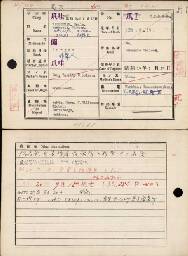
Volledige naamEmile Francois Victor Willemsen (エミエル フランスク フイクトル ウイルムソン)
NationaliteitNetherlands (蘭)
Rang(非軍人)
Plaats gevangename爪哇; Java
Datum gevangename19/01/15; 1944/01/15
Beroep(市土木局の監督者)
Opmerkingenn/a
Kamp 1爪哇19/01/15; Java POW Camp 1944/01/15
Kamp 2馬来; Malay POW Camp
Japans 1爪I (ジャワ俘虜収容所第1分所) 27820; No.1 Branch Camp of Java POW Camp 27820
Japans 2馬I (マレイ俘虜収容所第1分所)26031; No.1 Branch Camp of Malay POW Camp 26031
Andere informatieDeparted to be transferred to Malay POW Camp on 14 September 1944; Transferred to No.1 Branch Camp of Malay POW Camp; Died of bronchial pneumonia at 14:30 on 15 September 1945. Burial; Died on 15 September 1945.(JA286. P.40); Fell ill on 20 August 1945; Place of death: Patient Receiving Station of Malay No.1 Branch Camp, Pekanbaru, Riau province, Sumatra; (19/9/14 馬来俘虜収容所へ移管ノ為出発; 馬来俘虜収容所第1ヘ移管ス; 昭20/9/15 気管支性肺炎ニテ死亡 午後2時30分; 昭和20年9月15日死亡 (JA286. P.40); 昭和20年8月20日発病; 死亡場所: スマトラ,リオ州,パカンバル馬来第一分所患者療養所; )

Source citation

National Archives, PoW cards
Min. van Binnenl. Zaken: Stamboekgegevens KNIL-militairen met Japanse Interneringskaarten 1942-1996, Den Haag, archive 2.10.50.03, inventory number 458

A research guide is available for this source


View on source website

Internet address

  • https://www.openarchieven.nl/ghn:70af6bac-a05a-ce8b-2fea-c61b5fe3d601

To have Open Archives automatically search for additional information and related documents, you must be logged in.


Comments

Are you the first person who provides additional information?


You are not logged in yet

Login
Not a subscriber? View subscriptions!

Scan

Scan

Click the image to zoom in or download the image

Find your ancestors and publish your family tree on Genealogy Online via https://www.genealogieonline.nl/en/

Report an error

There may be errors in the data of documents. Copying data from (scans of) originals is human work. But computers that can read handwriting can also make mistakes.

If you find an error in the data you are encouraged to report it so that this can be corrected in the source at the archival institution or association.

To use this feature, you need to login first.

Download as GEDCOM or PDF

If the information you find on Open Archives, is useful for your research, you can download it in PDF and GEDCOM format.

GEDCOM files can be imported into your family tree program. This way you do not need to type all the information in your family tree program.

To use this feature, you need to login first.

Mark document as favorite

You can add the documents you find on Open Archives that are useful for your research to your list of favorite documents. You can organize this list and when searching you will immediately see which documents are already on your list of favorite documents.

Favorite person entries can be downloaded in PDF format (ideal for printing) and GEDCOM format (ideal for reading into your family tree program).

To use this feature, you need to login first.

Add comment

Do you have additional information about the historical document? Then add it so that other researchers can benefit from it as well.

To avoid spam and invasion of privacy of living personas, comments are checked before being published.

To use this feature, you need to login first.

Automatically search for the children

Open Archives searches automatically, based on available records, for the children of couples.

If children are found, this will be indicated with a purple = sign (a gray = sign does not imply that there are children).

To use this feature, you need to login first.

Automatically search for the children

Open Archives searches automatically, based on available records, for the children of couples.

If children are found, this will be indicated with a purple = sign (a gray = sign does not imply that there are children).

To use this feature, you need to login first.

Automatically search for the children

Open Archives searches automatically, based on available records, for the children of couples.

If children are found, this will be indicated with a purple = sign (a gray = sign does not imply that there are children).

To use this feature, you need to login first.